
Skip to content

Platform knowledge

The Niagara Framework, explained

Everything we build sits on Tridium’s Niagara Framework — the open platform that connects field devices, controllers and enterprise systems into one programmable environment. Here is how the pieces fit together, and where Fiabtec adds engineering value at every layer.

One platform

Open. Connected. Intelligent.

Niagara normalises data from any protocol — BACnet, Modbus, OPC UA, MQTT and dozens more — into a single object model. On top of that model sit the services every project relies on: security, alarming, history, scheduling, tagging and search.

Because the platform is open, it can be extended in native Java. That is exactly where Fiabtec operates: custom drivers, custom components and custom analytics that behave like first-class citizens of the framework.
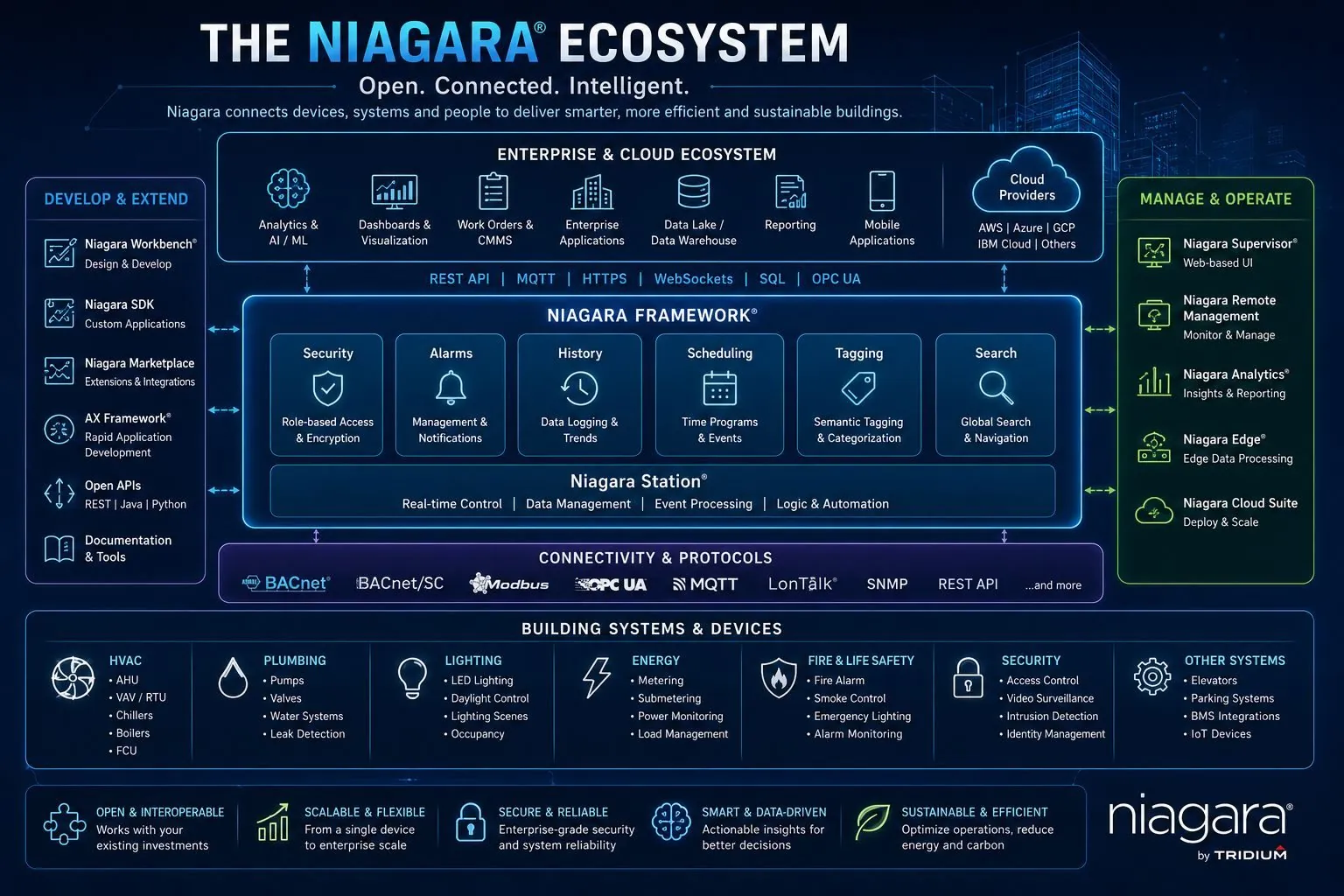
The Niagara ecosystem: the Niagara Framework and Niagara Station at the centre, with services for security, alarms, history, scheduling, tagging and search; development tools on the left, management and operations tools on the right, enterprise and cloud systems above and connectivity protocols below Full size
The Niagara ecosystem. Select to enlarge.

Reference architecture

Four layers, one system

A well-engineered Niagara installation is organised in layers. Each one has a distinct job — and a distinct set of failure modes we design against.

Layer 1

Field devices

AHUs, chillers, meters, sensors and actuators — the physical equipment producing the raw signals everything else depends on.

Layer 2

Controllers & edge

JACEs and field controllers running local control loops. Logic here must survive network loss — safety never depends on the cloud.

Layer 3

Automation platform

Niagara Supervisor and stations: point management, alarms, histories, schedules, tagging and the graphics operators use every day.

Layer 4

Enterprise & cloud

Dashboards, analytics, CMMS and data lakes consuming normalised, tagged data over REST, MQTT or streaming pipelines.

Glossary

Niagara terms, in plain English

The vocabulary you’ll meet in quotes, specifications and conversations with integrators.

Niagara Framework
Tridium’s software platform for connecting, controlling and analysing building and industrial equipment. Niagara 4 is the current generation; Niagara AX is its predecessor.
Station
A running instance of Niagara: the live database of components, points, alarms, histories and schedules for one controller or server.
JACE
Java Application Control Engine — Tridium’s embedded controller that runs a station at the edge, close to the equipment it connects to.
Supervisor
A station running on a server that brings many JACEs together, serving graphics, alarms and histories for a whole site or portfolio.
Workbench
The desktop engineering tool used to configure stations, build logic and install modules.
Baja
Building Automation Java Architecture: the component model underneath Niagara. Every object in a station is a Baja component.
BComponent
The Java base class for Niagara components. Custom logic and drivers are written as BComponents with typed slots — properties, actions and topics.
Module
A packaged Java archive (JAR) that adds components, drivers or views to Niagara. Modules can be code-signed so a station can verify where they came from.
Palette
The library of components available in Workbench. Installing a module adds its components to the palette.
Wire sheet
Workbench’s visual logic editor, where components are linked together to build control sequences. When to go beyond it.
Driver
A module that lets a station talk to a protocol or device, modelling it as a network of devices, each with its points.
Fox
Niagara’s own protocol for communication between stations, and between stations and Workbench. Its encrypted form is Foxs.
ORD
Object Resolution Descriptor: Niagara’s addressing syntax for locating any object — a point, a file, a history — inside or across stations.
Tagging
Metadata describing what a point is — its equipment, measurement and location — using dictionaries such as Project Haystack or Brick Schema, so software can interpret data without guessing from point names.
Px graphics
Niagara’s format for the operator graphics shown in Workbench and the browser.

Where it’s heading

AI-ready by design

The next generation of building systems feeds clean, semantically tagged data into analytics and AI platforms — and receives optimisation decisions back. None of that works without the fundamentals: reliable integration, disciplined tagging and a secure data path.

That is why we treat tagging and data quality as engineering deliverables, not afterthoughts. A station built this way is ready for whatever analytics layer you choose tomorrow.
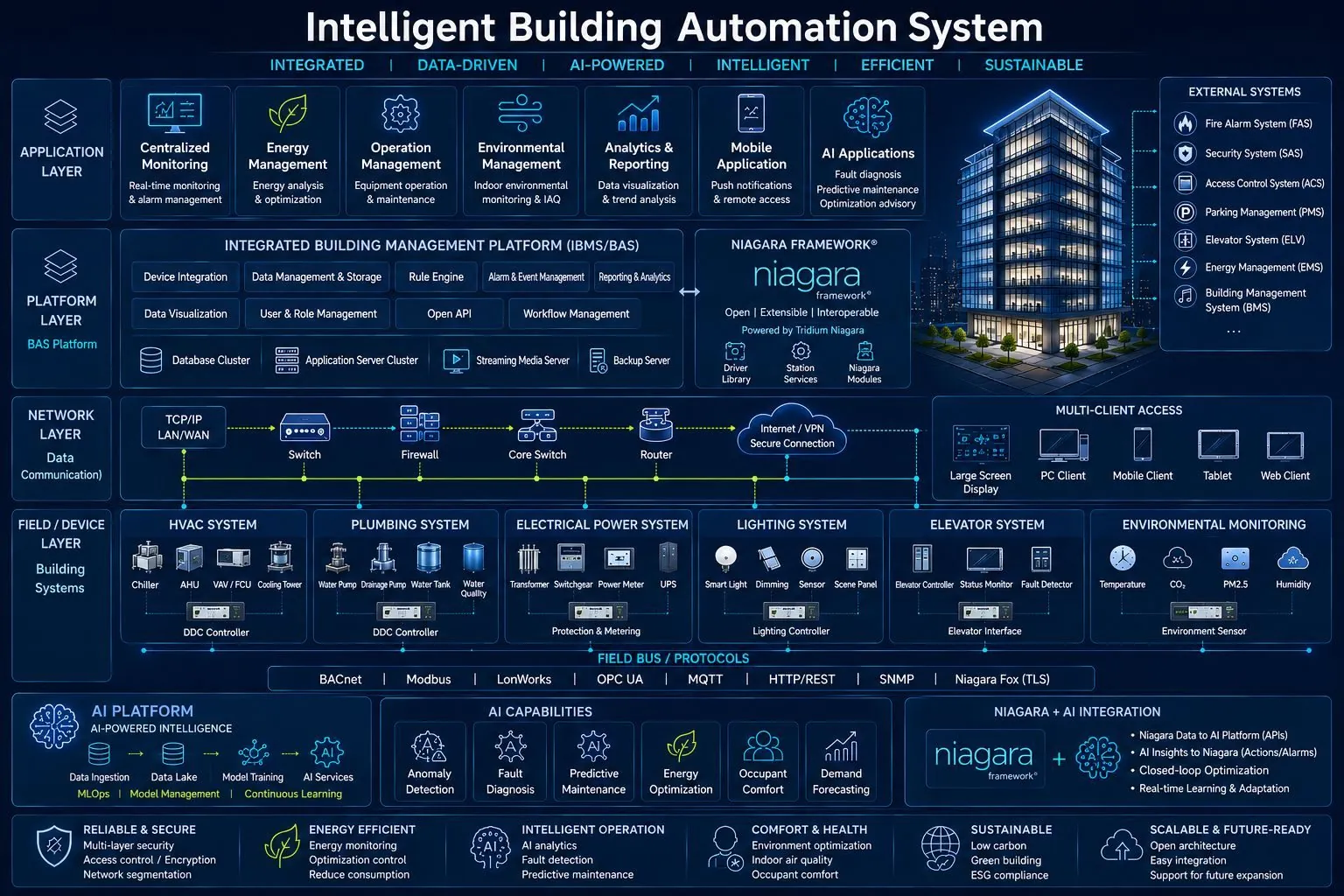
Intelligent building automation system architecture: field devices and building systems at the bottom, a network layer, the integrated building management platform, an application layer with monitoring, energy, analytics and AI applications, and an AI platform feeding predictions back into the system Full size
An AI-ready building automation architecture. Select to enlarge.

A reference HVAC-R controls architecture

How the layers look in practice for mechanical systems: equipment and sensors, controllers, the automation platform and the enterprise applications above it.
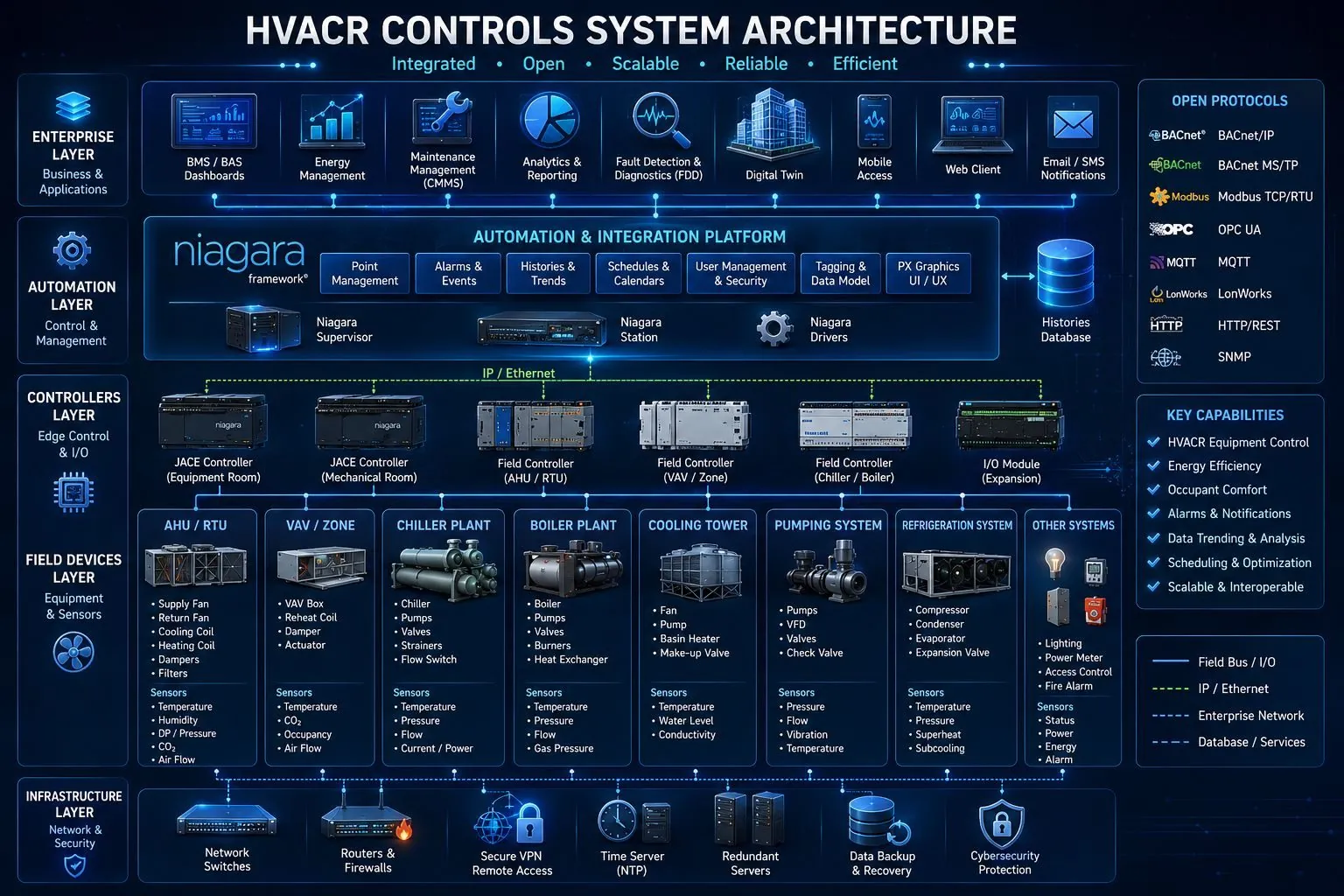
HVAC-R controls system architecture: field devices such as air handlers, VAV boxes, chillers, boilers, cooling towers, pumps and refrigeration; JACE and field controllers on an IP network; the Niagara automation and integration platform; and enterprise applications, with the open protocols supported listed alongside Full size
Select the image to open it at full size.

Where we fit

Fiabtec across the stack

Planning a Niagara project?

Tell us about your station, your equipment and what you need from the data — an engineer replies within 24 hours.

Talk architecture with us